
Many of us work with clients online and might be located in different time zones. While counting the difference in time is not difficult, spending time calculating each time is not necessary. Even more, if you are in a rush or busy with other tasks, you might mistake the difference and, as a result, come late to your online meeting.
Google Calendar is a simple solution that allows you to see two time zones simultaneously when planning your day or week.

If your primary time is 11 AM in Athens, then the time in London will be 9:00 AM.
We will guide you through the Google Calendar set up step by step using the Web version. You should be able to follow the same steps on your mobile app.
Google Calendar Set Up for Two Time Zones
To start the setup up you need to go to your Google Calendar and follow the steps below.
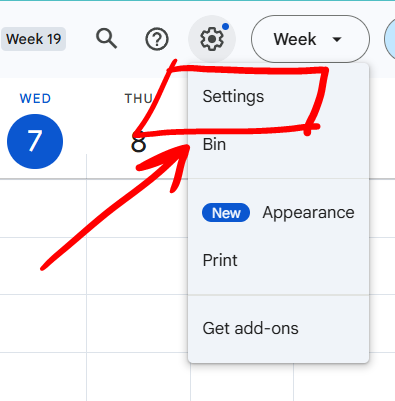
Step 1: Navigate to Google Calendar Settings
Click on the Gear Icon to see the Settings button

One click on the Settings button will take you to the calendar general settings page
Step 2: Turn on the Second Time Zone Display

Step 3: Choose the Secondary Time Zone from the List
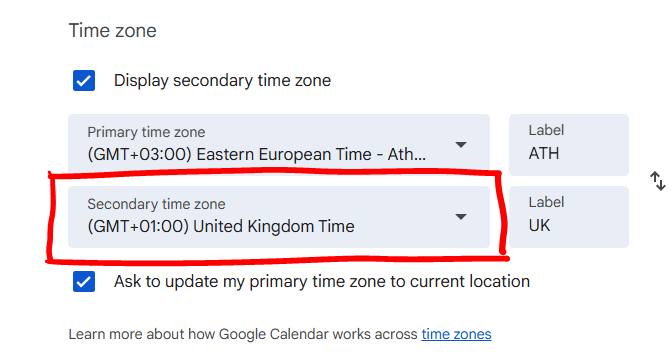
Once all settings are done, you may return to your calendar and enjoy your new feature. From now on, setting up meetings or scheduling your video premiere according to a different time zone will be easier.